Exercise 1
Adobe XD is a prototyping tool that can prove to be incredibly useful in the designing and visualisation of a website or in app design. A useful way to fully credit this tool is through a discussion of a personal experience navigating through tutorials that offer an insight into what the software has available. With the visual interface made available it allows a designer freedom to fully explore their ideas in the design process, by taking a blank canvas someone could produce a prototype at all different design and functionality levels. Here is the end product of one of the tutorials that made up part of this exercise.



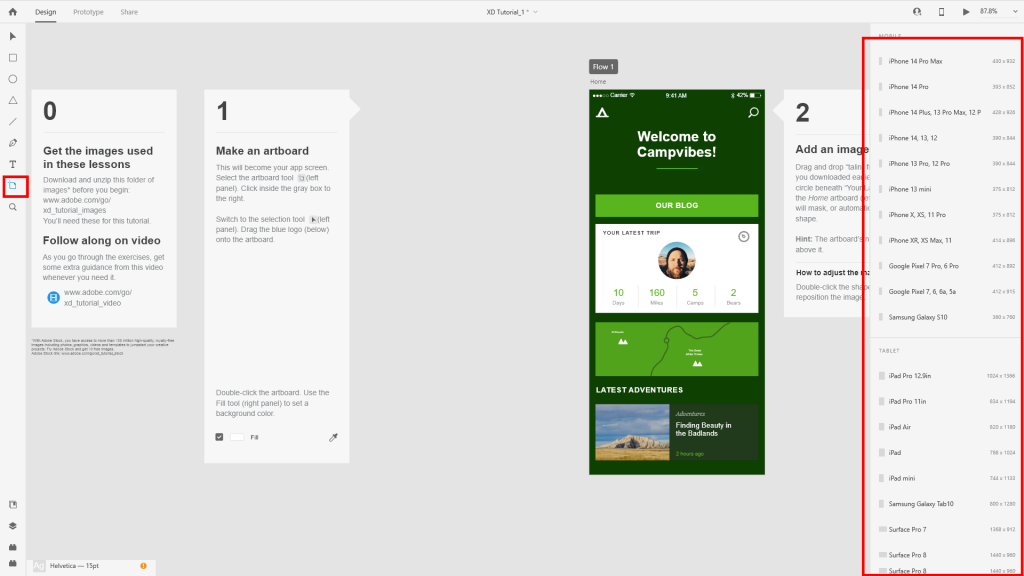
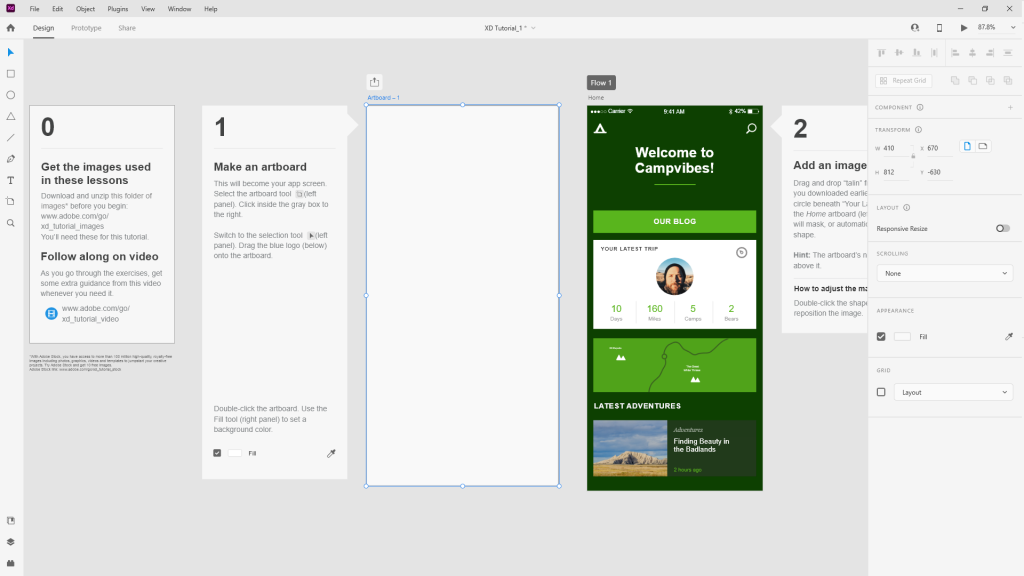
To begin with every project, it all starts with constructing an artboard, through the use of an easily accessed tool on the left toolbar of the window the user is able to construct an artboard of any shape and size anywhere within the document, to bring ease and efficiency, the user can find a list of default sizes for a variety of displays and mobile specifications available to them that are well used throughout the industry. Once an artboard is placed it becomes obvious that all the basic tools someone could expect are available. The ability to place text, shapes, change colours works almost identically to how someone using the adobe suite would expect. Once shapes and text begins to be placed and the composition is being finalised, the user may want to begin adding images to the document to begin to get a feel of what these designs may look like in more detail, Adobe XD offers features that effectively allow the user to be able to drag and drop these assets into place. The image will be placed into a mask allowing the designer to have even more creativity and flexibility with the final product. An enhanced feature of this is the capability of being able to place multiple images into the document at once. In this example from the second tutorial in this exercise, the page is for a hypothetical plant shop, in which the designer intends to have a list of different plants that are available to be interacted with in the design. By using the repeatable grid tool which allows exact copies of assets to be placed within the document at the drag of a box, this creates the destination for the desired images. The software automatically sorts them into the appropriate locations allowing the user to adjust any minor placement issues as and where needed.
All the components are in place and the layout and structure is finalised, the final iteration is within reach until a design note comes back that some features or pieces need changing and adjusting to fit within new ideas and directions. To adjust this it could be assumed that it would involve some time put in by the designer to rectify and adapt to the new criteria. An arguably highly important feature of Adobe XD allows the user to adjust these assets at the click of a button. Not only limited to the colours, the user has the option to adjust font styles and individual components that are used within the document. The true core of XD comes within the prototyping capabilities, through this the user can simulate a working web page or app to allow a physical version of a design that a user could interact with and experience in real time, that also provides a way to make adjustments and design changes easier and quicker, before heading into full development. With a system that offers a way to simulate functioning web page interactions as close to true as possible, a variety of methods exist to be able to create scrolling pages, interactions between components and overlays, among other design ideas. The next few images will show those functions and features that are available and were recreated using the tutorials available for this exercise. A final feature to add on top of these prototype interactions that can be made, is the use of the software’s auto animate function, this is a smart feature that allows dynamic animation to be added and displayed within the prototype tool. Here is a display of that process in use following some assets found within tutorial 3 of this exercise.